en


BM8 login and registration both start from the same two buttons in the site header: LOGIN for an account that already exists, REGISTER for a new one. Promotion pages carry a Sign up here link that opens the same registration form.
What you do in the first ten minutes after signing up matters more than the login itself. The name on the account, the bank account you register and the promotion you pick at the first deposit all set boundaries that are awkward or impossible to change afterwards. This page puts that setup in order, then covers look-alike pages, lockouts and what the account menu holds.
Registration asks for real personal details, and the terms state plainly that those details may be verified later. That verification is not a formality on the way in; it becomes relevant on the way out, because the withdraw rules say funds are paid only to a registered bank account and the account must be verified before a withdrawal is processed.
So the useful habit is simple. Register under the name on your identity documents, because as a rule a cashier will compare the registered member name with the name on the receiving bank account. A nickname, a shortened name or a relative’s account tends to surface as a problem at the worst possible moment, when there is a balance waiting.
Two more boundaries apply from the start. Promotions are claimable only from a Malaysian or Singapore IP address, and the terms allow one offer per person, family, household address, IP, e-mail, phone number, card, e-wallet or shared computer. A second account on the same connection is not a second set of bonuses.
On age: BM8’s own text sets the minimum at 18. This guide is written for adults 21 and over, and the rules where you live may differ again, so check them.
Before you continue
The first deposit decides which first-deposit promotion you can still claim. The Jackpot Starter Bonus 299% and the Welcome Bonus 130% are both once per account and both attach to a first deposit, so taking one rules out the other.
The reason to read before depositing is arithmetic, not caution. Turnover on these offers is calculated on deposit plus bonus, which multiplies fast: RM100 + RM299 = RM399, x40 = RM15,960 of wagering on the 299% offer, against RM100 + RM130 = RM230, x29 = RM6,670 on the 130%. A bigger headline percentage is also a bigger wagering commitment, and the comparison belongs before the money moves rather than after. The mechanics of each method, channel and bank sit with your first deposit.
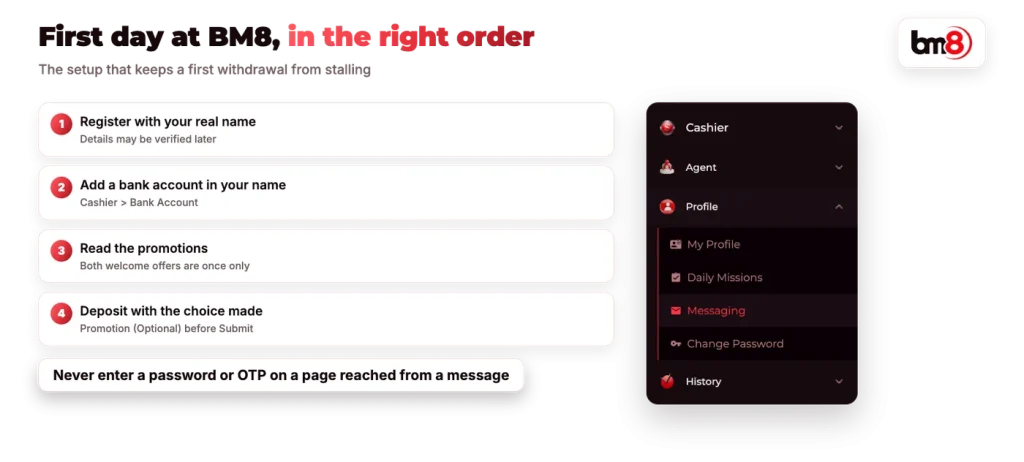
Popular brands in Malaysia get copied, and copies of a casino front page are cheap to build. The protection is boring and effective: reach the account only through an address you typed or saved yourself, and treat any link that arrives in a message, a group chat or a comment as unverified, however familiar the logo looks.
Never enter a password or an OTP on a page you reached that way. In general an OTP is a one-time key to whatever page asked for it, which is exactly why a cloned page asks for one. BM8’s support information states that staff never ask members for passwords, so a request for one is itself the answer.
Once you are logged in, Profile holds Change Password. Changing it after any suspicious link, shared device or public connection takes less time than explaining a drained balance to support.
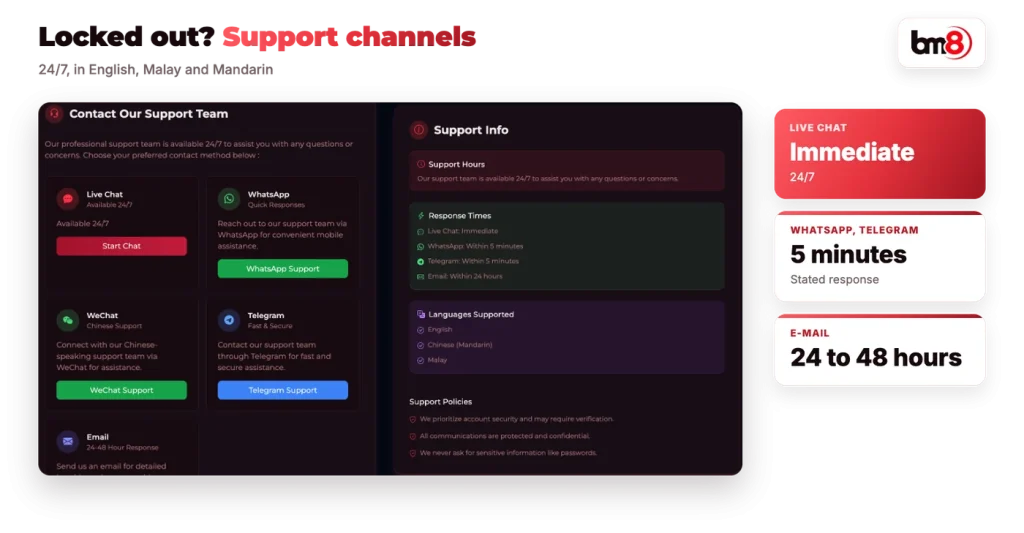
There is no password you can guess your way around, and support is the route back in. Live chat is listed as 24/7 with an immediate response, with WhatsApp and Telegram answering within 5 minutes and e-mail within 24 to 48 hours. Support operates in English, Malay and Mandarin, with WeChat used for Chinese-speaking members.
Have your registered details ready, since the same information that was requested at registration is what identifies you. After you regain access, set a fresh password under Change Password rather than reusing the old one.
No downloadable casino app is published, so the account runs in a browser. The only app in the picture is BM8’s Telegram app, which is how the free $5 promo code is issued and redeemed; that code carries 10x turnover.
| Account menu | What it holds |
|---|---|
| Cashier | Deposit, Withdraw, Bank Account, Rebate, Promo Code |
| Agent | Referral, Downline, Commission |
| Profile | My Profile, Daily Missions, Messaging, Change Password |
| History | Your own transaction and betting records |
Two entries deserve an early look. Cashier > Rebate is where instant rebate is claimed, and nothing is paid there unless you go and collect it. Messaging under Profile is where notifications and announcements land, which makes it the place a bonus or account message appears rather than your e-mail.
Those menus are where the money rules bite, and the rest of this guide takes each of them apart. For one view of how deposits, turnover, rebates and tiers connect, start with the bonus and cashier basics.
Registration runs from the REGISTER button in the header. Add and verify the bank account before the first deposit, not after it.